Concrete ballroom example
What a studio owner should picture.
Lesson packages and remaining lessons stay visible so staff are not guessing at the desk.

 Ballroom Booking
Download the official app for iPhone, iPad, or Android.
Payments + Packages
Bring the money and account side of the studio into clearer view: lesson packages, balances, purchases, who has lessons left, and who needs to pay.
Studio Operating View
Ballroom Booking
The problem
When lesson balances, purchases, and payment conversations are unclear, owners lose visibility and staff spend time reconstructing what happened.
What Ballroom Booking does
Ballroom Booking connects lesson packages, balances, checkout clarity, gift certificate context, and reporting tie-ins around studio operations.
Why generic software falls short
Generic payment tools can record money, but ballroom studios need the payment story tied to lesson packages, lessons remaining, low-balance moments, public offers, gift certificates, and owner review.
Concrete ballroom example
Lesson packages and remaining lessons stay visible so staff are not guessing at the desk.
Objection answered
Answers: Can we trust lesson balances, payment context, online package paths, and low-balance follow-up before using this with students?
Package view
Package conversations should connect what was bought, what was used, what remains, and what should happen next.
Demo proof check
Use the demo to connect purchase, lessons left, balance, next to the real workflow your studio needs, then decide whether this belongs in the first rollout.
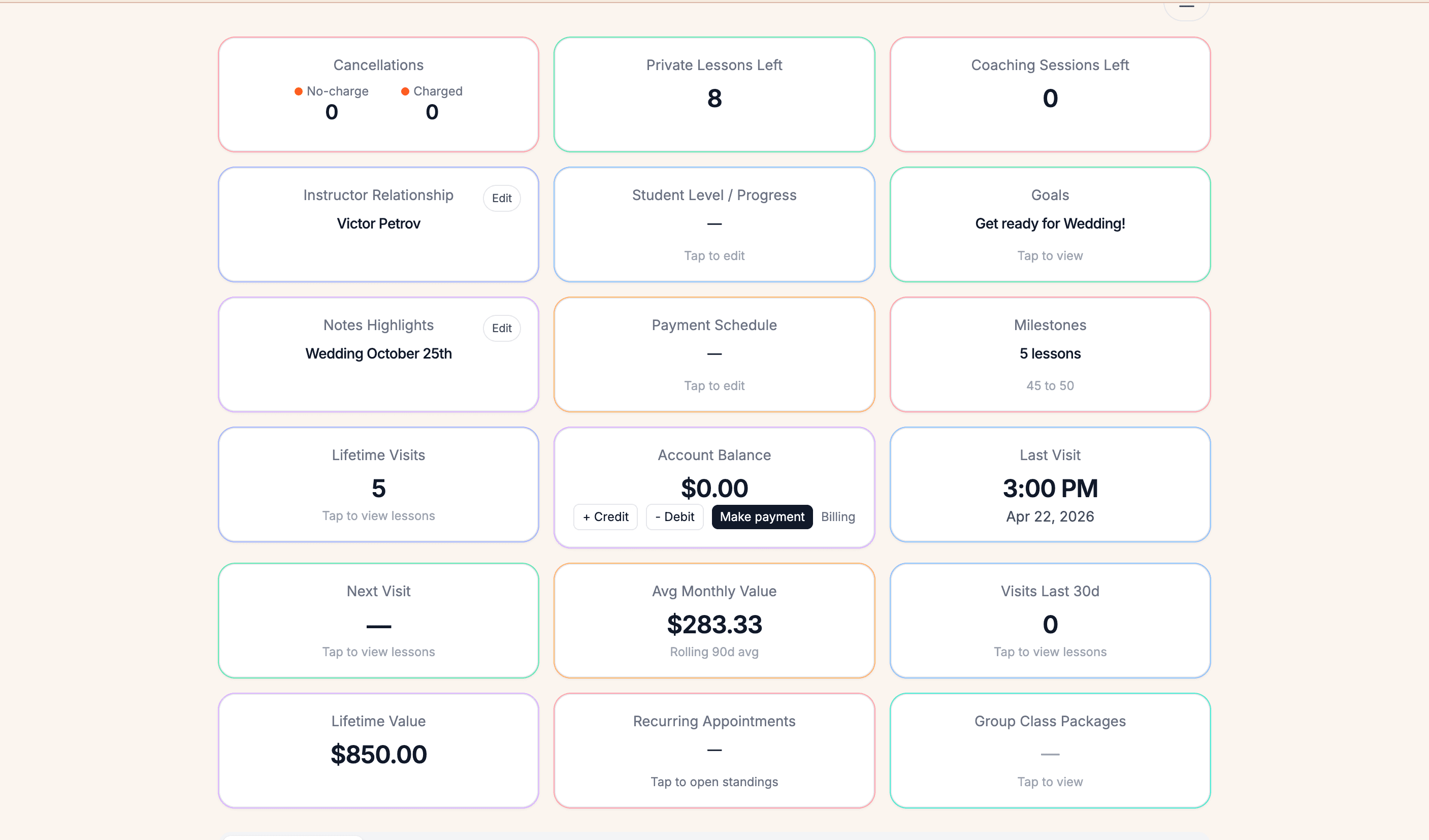
Package proof
The desk can see balances, purchases, and account context without side math.
What this screenshot shows
Lesson package proof
A lesson package is a prepaid lesson bundle that turns into trust work after the sale: what was bought, what was used, what remains, and what should happen next.
Low balances should create a practical next-step conversation before the student runs out.
Staff should see remaining lessons and payment context before answering renewal or balance questions.
Owners should confirm which packages can be sold online, which checkout paths are enabled, and when low-balance follow-up appears.
Student or couple balance visibility and online package sales depend on enabled account, portal, payment, and checkout setup. Verify those paths in the demo before relying on them.
Follow-up proof
Lesson packages create follow-up moments when a student is running low, has questions, or needs a renewal conversation. The proof is whether remaining lessons connect to a clear staff action.
Lead interest, intro offers, gift certificates, low lesson balances, missed lessons, and inactive students should create clear questions, not a noisy task pile.
Staff should be able to see the balance context before the student asks or before the renewal conversation becomes rushed.
Owners should confirm where low-balance and package follow-up appears before relying on it for retention.
Use the demo to confirm what is visible today, who owns the next step, and which outreach remains a staff decision. Do not assume automated messaging unless it is shown live.
Why this matters in a ballroom studio
Lesson packages are one of the places where trust can be won or lost. Students should not feel like the studio is guessing, and staff should not need a detective board.
Common workaround this replaces
Hand-counted lesson cards, spreadsheet balances, sticky notes by the desk, and awkward end-of-lesson payment questions.
Owner benefit
Owners can evaluate how Ballroom Booking helps make account conversations easier for staff, students, and the front desk.
Feature highlights
FAQ
Short answers for owners deciding whether this workflow belongs in the first demo conversation.
They affect trust, revenue, and the front desk conversation. Studios need a clear view of what a student bought, used, and still has available.
Yes. The demo should cover fit, rollout scope, and the current account workflows your studio needs to clarify.
Related workflows
Most studios evaluate Ballroom Booking by following the pain from one real workflow into the next.
Related resources
These guides give a studio owner practical questions to bring into a demo conversation.
Next step